Editorial Calendar Tools Compared for Distributed Teams
Most teams blame the tool when the problem is choosing the wrong category in the first place.
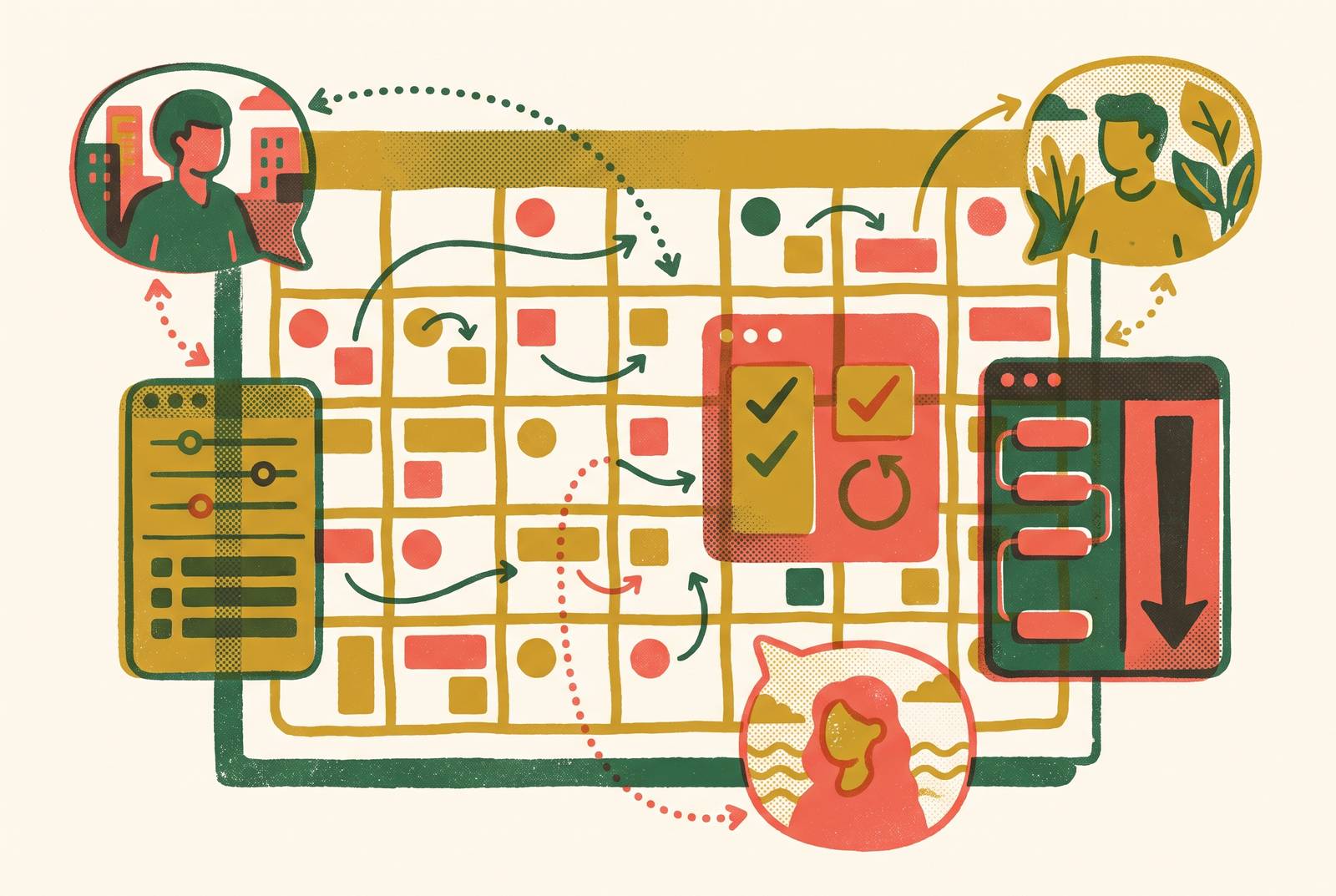
Teams rarely lack tools. Most have a calendar, a task manager, a shared drive, and at least one Slack channel dedicated entirely to "content." What they lack is a system built for the specific ways distributed work breaks: handoffs that stall overnight because the next person is asleep, approval chains that fork across four different apps, and visibility gaps where nobody quite knows if Tuesday's post actually cleared legal.
Call it the "Version 3 Final" trap. Feedback comes in through Slack, then email, then a comment on a Google Doc someone forgot to resolve. By the time the piece is ready to publish, there are four files with confident, contradictory names, and the version that ships is whichever one someone happened to have open. Review lives in scattered threads, and that's what produces the mess.
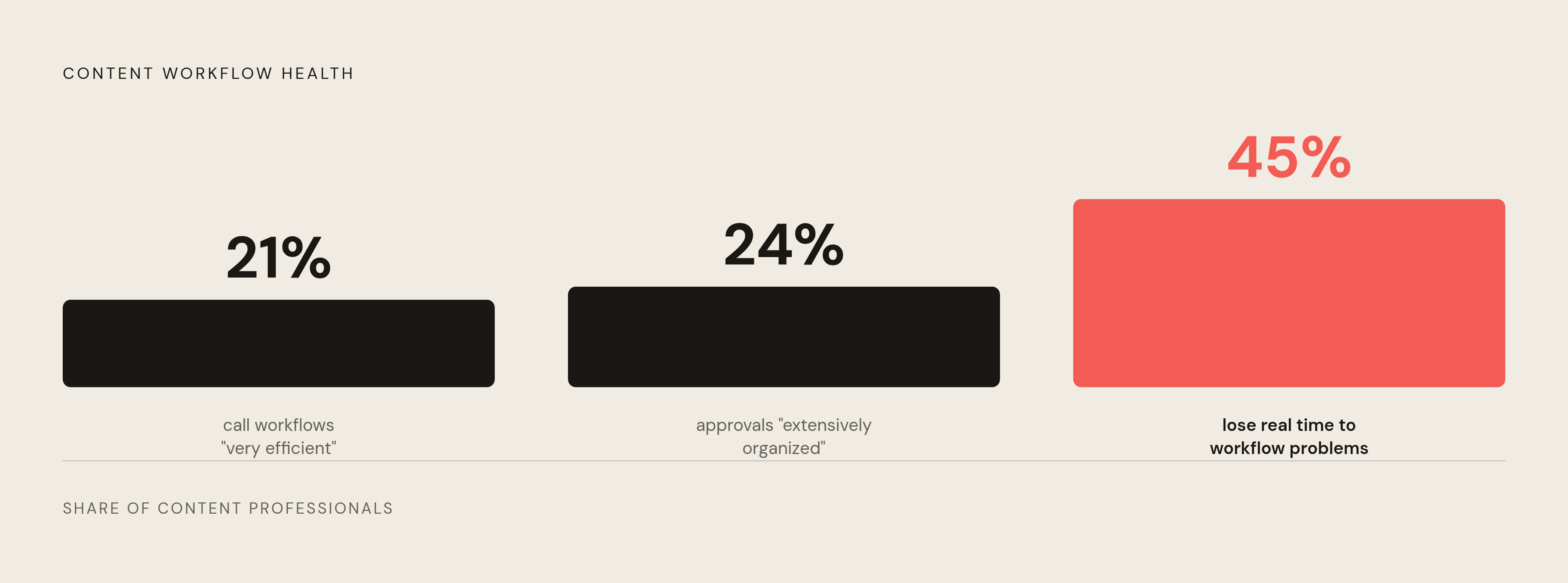
The numbers back this up. A study from Canto and Ascend2, summarized by MarketingProfs, found that only 21% of content professionals call their organization's workflows "very efficient," and just 24% say their approval workflows are "extensively organized and managed." Nearly half, 45%, report losing real time to workflow-related problems. Read those together and a pattern shows up fast: most teams have something resembling a review process, but almost nobody's written it down, so it lives in people's heads and collapses the moment one of those heads goes on vacation or logs on eight time zones away.
One B2B software company, 65 employees with a distributed team of 7 spread across 3 locations, averaged 16 days to get a single blog post approved, with some articles needing up to 12 separate email threads to close out. That's an extreme case of a completely ordinary trajectory: communication silos, version confusion, no shared view of where a piece sits in the pipeline, compliance checks stacked across time zones that barely overlap.
Feature count matters far less than whether a tool handles these specific failure modes for a team that never sits in the same room. Here's the position this piece is going to argue, stated plainly up front: most teams buy the wrong category entirely, then spend six months blaming the tool for a mismatch they created at checkout. Picking a flexible workspace like Notion specifically because it looks lightweight, then rebuilding the same chaos inside it by hand, is a common version of that mistake, and it's covered two sections from now.
The three categories of tools distributed teams are actually choosing between
Strip away the marketing pages and three real categories emerge. Vendors work hard to blur the lines between them, because a wider category means a wider buyer pool, but the blurring is exactly what causes the mismatch problem.
First, general project management platforms bent into editorial shape: Asana, ClickUp, Notion. Flexible and familiar, often already running somewhere else in the company, but none built for publishing, which means a team has to construct that workflow itself, from scratch.
Second, purpose-built editorial and marketing calendar tools: CoSchedule, Planable. Less setup, more native support for the actual mechanics of scheduling and approving content before it goes out the door.
Third, database-driven systems, with Airtable as the clear example. Maximum control over metadata and structure, at the cost of turning someone on the team into that system's unpaid, unofficial developer.
Here's a distinction most teams get backwards: an editorial calendar tool organizes the schedule, meaning what publishes when and who owns each handoff. A content strategy tool decides what belongs on that calendar in the first place. Every tool in this comparison lives in the first bucket, full stop. A slicker calendar will not tell a team what's worth publishing, and no amount of shopping around across these seven options changes that.
Team size and complexity change the math, too. A large team juggling multiple brands, multiple channels, or a mix of digital and print gets more out of a dedicated editorial platform, while a smaller, uniform team can often make a general tool work, provided someone configures it properly and keeps configuring it, indefinitely, which is the part nobody budgets for. A team that buys a social-first approval tool when it actually needs a full editorial pipeline manager has just moved the same problem to a shinier interface.
One more thing before going further: AI-driven scheduling and drafting features are showing up across all three categories now, not just the purpose-built tools. That's shifted the baseline expectation, and it comes back at the end of this piece.
Asana: editorial workflow at scale, with tradeoffs in purpose-build depth
Asana's real advantage for spread-out teams is multi-homing: a single content task can live in the blog calendar and a product launch plan simultaneously, without anyone duplicating work or losing track of which version is current. For teams where editorial intersects with five other campaigns at once, that's the difference between one source of truth and three conflicting versions.
The tool also offers list, board, calendar, and timeline views of the same pipeline, so an editor, a project manager, and an executive can each look at the work in whatever format makes sense to them. Workload and timeline views add visibility into who's overloaded, which matters more across time zones than it does in an office, where overload is at least visible from across the room.
Asana rolled out AI Teammates in early 2026: prebuilt agents that summarize incoming content requests, triage them, and flag deadlines at risk of slipping. Useful for teams running a high volume of concurrent projects, though it's an add-on bolted to a system, and the underlying setup work that system still demands doesn't go away.
That setup work is the part the sales page glosses over, and it's worth saying plainly: Asana was built as a general project tool, not for editorial specifically. Teams have to translate it into something resembling a publishing system, and that translation takes time and ongoing discipline to maintain. Pricing adds its own friction, since the free plan is thin enough now that most teams outgrow it fast. The jump to the Advanced tier, needed for portfolio management, approvals, and proofing, runs more than double the Starter price.
Best fit: distributed teams running high-volume, cross-functional campaigns where editorial is one piece of a bigger machine. Worst fit: a team whose entire operation is publishing content and nothing else, because that team is paying for capability it will never touch.
CoSchedule: the purpose-built option for teams that want editorial and social in one calendar
CoSchedule's pitch to a distributed team is simple: less translation. Nobody has to bend a general project tool into something resembling a publishing workflow, which cuts onboarding friction for contributors who join asynchronously and need to understand the system on day one, not week three.
The defining feature is native support for both content planning and social scheduling inside one calendar. Editors, social managers, and outside stakeholders can each look at the same underlying work through a view built for their role, instead of everyone squinting at the same spreadsheet trying to find their piece of it.
That's a strong fit for marketing teams running email, ads, and social in parallel, and it's the same coordination problem that end-to-end platforms like Letterstory are designed around, covering drafting through publishing in one pipeline. It's a poor fit for a solo writer or a two-person creator team, where CoSchedule's depth turns into overhead nobody asked for. Pricing reflects the positioning: the Marketing Calendar starts at $29 per user per month, and the more advanced Marketing Suite requires a sales demo with custom pricing, one of the higher entry points in this whole comparison. X/Twitter profiles get billed separately too, and teams with a wide social footprint often find the lower tiers cramped.
Best fit: mid-to-large marketing teams that need a genuine editorial hub, where the per-seat cost pays for itself in coordination time saved.
Airtable: maximum metadata control, at the cost of becoming your own system developer
Airtable isn't a calendar out of the box. It's a spreadsheet-database hybrid, and it's the right call when a team needs custom fields most calendar tools were never built to track: audience segment, funnel stage, repurposing status, language, asset type, campaign linkage. If a content calendar has to answer ten questions at once, Airtable can hold all ten.
Its relational structure lets a content table link directly to pillars, channels, and campaigns, so every piece traces back to a strategy element. That's genuinely rare, since most tools here treat the schedule and the strategy as two separate systems that happen to live near each other; Airtable is one of the few that actually connects them.
For teams managing multiple brands or channels, that metadata depth pays off fast, and filtering a large pipeline by brand, contributor, or channel is quicker in Airtable than in almost anything else on this list.
Here's the tradeoff nobody puts on the pricing page: someone has to build it, and then someone has to keep building it as needs shift. That's not a subscription fee; that's a job description, and teams that skip hiring for it end up with a database that only one person understands, which is its own kind of single point of failure. Pricing starts at $10 per user per month, with the Team plan running roughly $20 per user per month, cheaper up front than CoSchedule, but the real cost lives in setup time and maintenance, not the invoice. There's no direct social publishing, and the mobile experience is thin: the database views that make Airtable powerful just don't render on a phone screen, a real problem for contributors checking in from the field rather than a desk. Airtable's pricing has also climbed upmarket over recent tiers, which changes the math for teams that picked it originally because it looked like the budget option.
Best fit: teams with a dedicated ops or marketing-ops person willing to own the build, indefinitely. A poor first tool for a team without that role already filled, and a poor rescue plan for a team hoping a tool will paper over a staffing gap.
Notion: the flexible starting point that hits a ceiling when approvals and scale arrive
Notion shows up constantly as the place distributed teams document their content process: SOPs, workflows, shared references that freelancers and stakeholders can find without asking someone to explain it over a call. Some teams use it exactly this way.
The appeal is flexibility. A team can build a calendar shaped exactly like its own process, then bolt on task tracking, documentation, and a team wiki, all inside one workspace, without paying for three separate tools.
Here's the part worth stating without hedging: Notion is a weak choice for any team that already knows approvals are its bottleneck, and picking it anyway is a common mistake in this whole comparison. Publishing and scheduling to any channel are absent, and its approval workflows depend on manual workarounds, a status field here, a comment thread there, none of it structured or auditable the way a dedicated review flow would be. That's the same failure mode from the opening of this piece, just showing up again. Teams that pick Notion because it feels lightweight often end up rebuilding, by hand and one comment thread at a time, the exact "Version 3 Final" chaos they were trying to escape.
Multi-brand agencies running active client review cycles hit this wall quickly, though smaller teams that don't yet need automation or formal approval structure can get real mileage out of Notion before that happens. Mobile rendering has the same weakness as Airtable: the database views that give the tool its power don't translate to a phone screen, which matters for anyone contributing from somewhere other than a desk. Pricing is friendly compared to most of this list: the free plan covers solo use generously, Plus runs about $10 per user per month billed annually, and Business runs about $20.
Best fit: teams early in building out a content operation, who need documentation and basic scheduling before committing to something heavier. Teams that outgrow Notion usually know it, because the approval bottleneck is what finally breaks.
ClickUp: broad capability for teams willing to learn its logic
ClickUp's whole pitch is consolidation: task management, communication, and content planning inside one platform, which appeals to any distributed team trying to cut the number of systems contributors bounce between during a workday.
Customizable views and templates give agencies a way to visualize multiple projects at once, and the platform scales into genuinely complex, multi-client setups without falling over. The tradeoff is real, though, since ClickUp asks a team to learn how it thinks first, and that's a meaningful cognitive load. If contributors across different time zones are each onboarding on their own schedule, that friction doesn't stay contained; it compounds until someone finally has to write internal documentation just to explain the system.
Like Asana, ClickUp has no native publishing or scheduling to an actual channel. Tasks can track the publishing process step by step, but the loop never closes; someone still has to go hit publish somewhere else. There's also no native content performance analytics, a real gap for any team trying to tie planning back to results. Pricing is the most accessible of the general-purpose tools here: a free forever plan exists, and paid tiers scale up from there.
Best fit: teams already running ClickUp for broader project management who want to extend it into editorial, more than teams picking their first dedicated content system from a blank slate.
Planable: approval workflows built for social-first agencies, with scope limits to match
Planable answers the approval bottleneck about as directly as any tool on this list, and it's worth leading with for that reason. Teams build the post inside Planable and clients see exactly how it will look on Instagram, LinkedIn, or Facebook before it goes live, rather than emailing spreadsheets or PDFs back and forth for sign-off. That closes the interpretation gap that causes so many revision cycles in the first place: nobody's guessing what a caption looks like once it's live, because they're looking at it already rendered.
Comments and approvals sit directly on the post preview, which creates an auditable trail, a sharp contrast to an approval chain scattered across a Slack thread from four days ago that somebody now has to scroll back through to piece together.
Forrester Research found in 2024 that 62% of marketing decision-makers name approval cycles as the single biggest bottleneck in content production. Of everything covered here, Planable is the tool most directly built to shrink that specific cycle, and its core feature and the core problem line up closely.
The tradeoff is scope. Planable is built for social media collaboration, mostly for agencies juggling several client accounts, and it isn't suited to long-form editorial pipelines or multi-channel strategy work or anything documentation-heavy. Pricing is approachable: a free plan covers up to 50 total posts, and paid plans start at a low per-user monthly rate billed annually, notably cheaper to get into than CoSchedule.
Best fit: social-first agencies where the speed of client approval is the real bottleneck and most of the content mix is social posts rather than long-form or multi-channel work.
How to match tool type to the actual friction points on your team
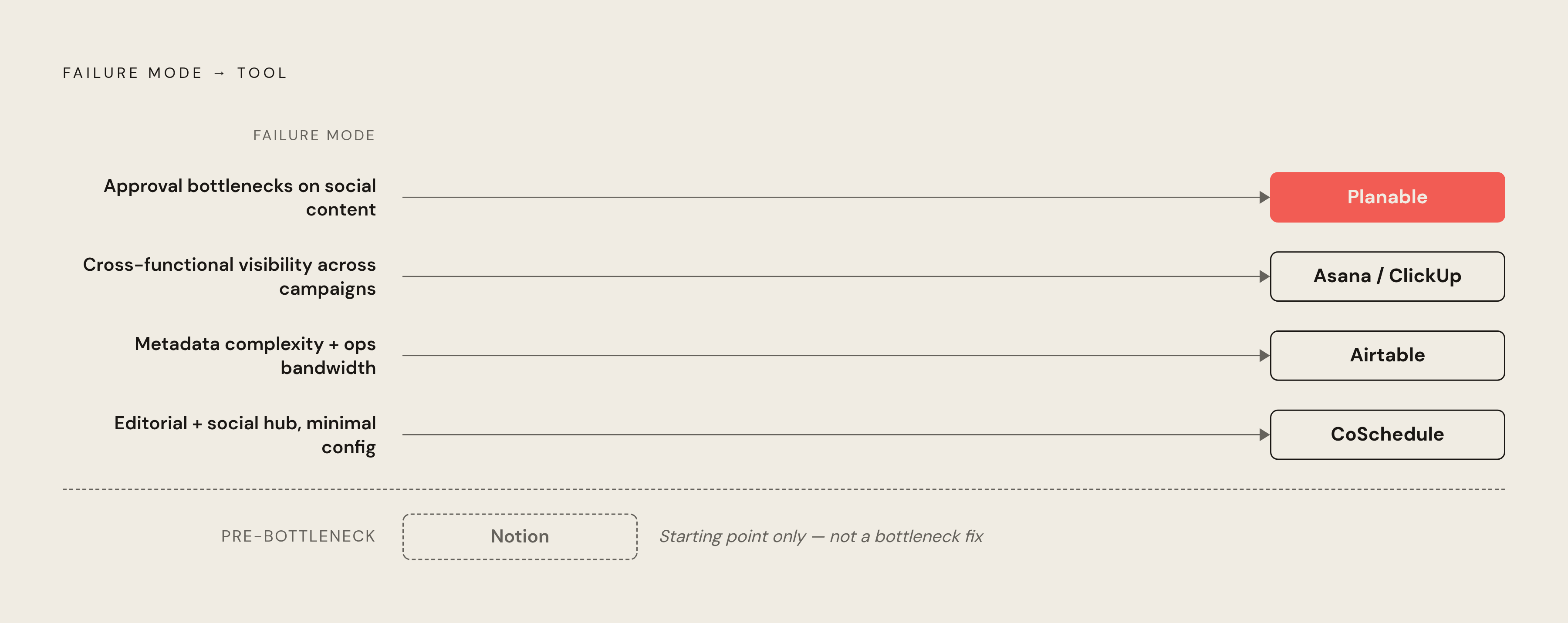
Start from the failure mode. Look at the actual thing that goes wrong on a Tuesday afternoon, more than the thing the sales rep says will go wrong on the demo call.
If the problem is approval bottlenecks and client feedback cycles on social content, Planable addresses that most directly, and nothing else here really substitutes; if the problem is cross-functional visibility across campaigns where editorial is just one workstream among several, Asana or ClickUp fit, with the setup cost priced into the decision from day one instead of discovered three months in; if the problem is metadata complexity, tracking content across brands, channels, and funnel stages, and there's operational bandwidth to build and maintain a system, Airtable earns its keep; and if the goal is one hub for editorial and social without heavy configuration, CoSchedule does that, at a higher per-seat cost that has to be worth it. Notion belongs on this list only for teams that haven't hit an approval bottleneck yet; the moment approvals become the actual complaint in the room, a heavier tool earns its keep.
A second axis matters just as much: how async is this team, really? Tools with structured, auditable approval flows, Planable and CoSchedule chief among them, cut down async coordination overhead more than flexible workspaces like Notion or ClickUp, where approval status lives in whatever workaround someone invented last quarter. The mobile weakness shared by Airtable and Notion isn't a minor annoyance either, since it's a practical failure for any team whose contributors work from a phone half the time, not just from different time zones.
One gap runs through every tool in this comparison, and no amount of shopping around fixes it: none of them bridge editorial scheduling with content strategy. They organize when things publish and who signs off. Deciding what's worth publishing in the first place is a separate question, and every team here answers it somewhere else, on its own, usually in a meeting nobody wrote down.
Sit with this number for a second: 52% of companies regularly miss deadlines because of workflow bottlenecks. That statistic should reframe the whole exercise. The tool matters less than whether its structure actually matches how a team makes decisions and hands off work between people who aren't in the same room to sort it out face to face.
AI features are becoming part of that calculation rather than a bonus tacked onto the marketing page. Teams running high volumes of content should weigh whether a feature like Asana's AI Teammates cuts coordination overhead enough to justify the tradeoffs of a general-purpose platform. For teams that want strategy built into the workflow from the start, platforms pairing editorial scheduling with guided brief-and-draft support close part of the gap between deciding what to publish and actually getting it out the door, which is exactly where distributed teams lose the most time to begin with.