Editorial Calendars in Content Operations Platforms
Editorial calendars shift from scheduling tools to workflow engines as teams and channels multiply.

A company uses an editorial calendar to decide what gets published, where, and at what time. Inside an actual content operations platform, the calendar stops functioning as a plan and instead becomes core infrastructure which lets teams and channels, plus ever more brands, run coordinated publishing at once. A scheduling tool is how most teams still use their calendar. Most teams run them the wrong way: a calendar should drive the workflow, not just log it, and that gap between the two keeps widening as the team takes on more outlets or labels.
First, look at its form. Here, each calendar keeps publication days, assigned creators, formats, channels, progress, plus keywords and themes each item supports. Consider it the skeleton. The difference between an editorial calendar and to-do lists comes down to that final element: it links each item to a marketing objective or reader requirement, not just noting Thursday's deadline.
Two words get thrown around loosely. Every quarter or year, the editorial calendar sets strategy and themes for your whole team. The content calendar sits below that layer, planning on a shorter cycle, and records each piece, its deadlines, and its assigned owner. Experienced teams use both together: an editorial layer picks the goals, while a content layer does the work to finish them. According to the Marketing Insider Group, 65% of leading B2B marketers keep a written content strategy, versus 14% for the bottom tier. A calendar makes the strategy useful to the team, not a deck made once and ignored.
Why a spreadsheet stops working as content operations scale
A little team publishing for a single company does okay with Spreadsheets. Things fall apart as contributors, channels, and brands multiply; when teams hold onto a spreadsheet too long, they decide to operate with bad information instead of saying their tool is broken.
The same problems always show up, and they follow the exact same pattern. Version tracking fails first: when several people edit one document without a central reference, somebody inevitably ends up using a stale draft. Visibility breaks down right after, because nothing refreshes without someone pushing it. Someone has to remember to change a cell from "drafting" to "in review," and if they forget, the whole team plans around bad information. Workflow handoffs break down as well, since no spreadsheet can block an article from going live before an editor has reviewed it. All it offers are rows plus columns, never any order. As channels grow, tabs multiply until no one can take in the whole picture. Bring in more approval, and it all spills over to email, where choices get made and then lost in an inbox.
Buffer shared that dropping ad-hoc sharing for a structured calendar helped publishing consistency by mapping content themes onto set dates so every platform finds its own pace rather than whatever's remaining. Mailchimp's calendar-driven planning reduced production bottlenecks by 40% compared to their earlier request-based system.
Agencies see this issue pile up quickly. Five brands each in their own spreadsheets leaves five different records, with no shared picture of the whole. Mistakes and late deadlines multiply as you add more clients, rather than just keeping pace. The spreadsheet can capture what the team intends doing. Spreadsheets can't enforce any workflow, stop publication from going live, or instantly catch issues across two brands. The gap stays structural, and better formatting never fixes it.
The maturity model: from basic scheduling to operational infrastructure
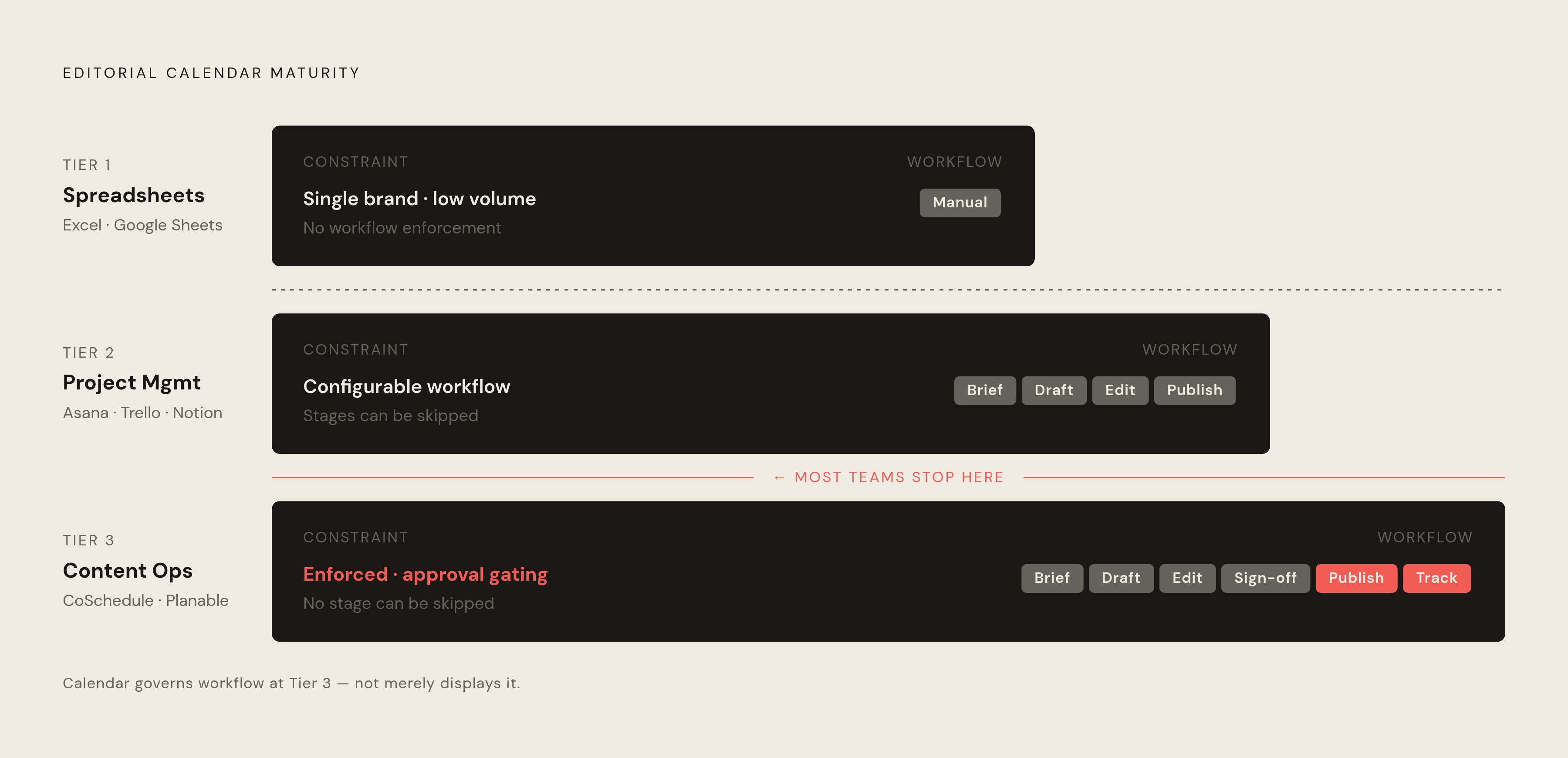
Three levels come up in real life, and most groups can find their spot on this scale pretty easily.
At Tier one, a spreadsheet such as Excel or Google Sheets works for one company with small volume if you don't need to enforce any workflow. Tier two adds project management tools like Asana, Trello, Notion, and ClickUp. You get task handoffs, deadlines, plus calendar or other views, making your workflow fully configurable. But they weren't built specifically with editorial work in mind. General-purpose tools bent to fit editorial work, and that bending is visible.
CoSchedule, Planable, plus Aprimo form Tier three, a content operations platform. Publishing workflows get built right inside the calendar itself, structured around editorial-specific stages: brief, draft, then edit, sign off, publish, track results. Tier two changes more than just the look. Tier three flips the setup: its calendar itself governs your workflow rather than just displaying it, and nothing will publish before earlier stages wrap up. With Tier two, a team can configure their workflow. Tier three won't allow one to be missed, and that's exactly why this whole category is here.
A few features signal that level of growth. With Multi-channel visibility, you see social, email, articles, and ads together instead of jumping between tools for each. Role-based rules keeps authors, approvers, plus customers seeing only what’s relevant to them. Approval gating holds content back from moving ahead until the previous phase is approved. Dependency mapping keeps work from being assigned until the background info is done. Tasks advance and notifications go out through automation, so nobody has to manually keep nudging them. Attachment keeps briefs, graphics, text, and style rules with that content itself, not left in some folder they forget to open.
Behind all this, one change needs naming: most companies now use headless architecture or a composable architecture, so a calendar layer must route content by API into multiple channels, not pass it to one CMS. This reshapes the connections any calendar tool must make, and is one reason tier three is where the category keeps growing.
What each major platform category actually offers editorial teams
Trello is built around a kanban, card-based system, with workflow stages represented by columns: Ideas, Assigned, Writing, Editing, Fact-Checking, Design, Ready for Publication, Published. It's simple to pick up, gives you clarity at a glance, and works alongside tools such as Slack, Dropbox, and Google Drive. It was not built specifically for editorial teams, so Trello lacks built-in content versioning, analytics need paid plans, and cards become cluttered as publishing volume climbs. Tiny teams looking for a graphic workflow can use it to skip the overhead that an editorial-specific tool brings, but it stops helping once your team asks for audit records.
Asana gives teams calendar and other views, with Workload built into Portfolios, so they can use whichever layout fits their planning style. Custom columns store editorial metadata, like length, who it's for, and tags, on each task. Automation rules handle the repetitive handoffs: mark a piece "Ready for Edit" and it auto-assigns to the editor and sends the notification. Linking through dependencies makes sure writing comes before editing, which comes before approval, which comes before scheduling. For project management tools in general, this best fits teams needing strong plans without steep setup, with a broad no-cost tier.
ClickUp stretches even further, folding scheduling, creation, documentation, analytics, plus whiteboards alongside hours into one workspace, helping teams handle the whole lifecycle of content from concept to results instead of hopping across tools. A NAV43 practitioner plan shows an editorial calendar that is ClickUp-native, built around 7 stages: 6 ahead of publishing and one stage, Scheduled/Published, with a Citation-Readiness Audit included. When a team builds out its own setup, this serves as a useful illustration showing how far the reach of ClickUp's tools stretches.
Planable was built specifically to help agencies and social media teams, with the calendar not just bolted on but sitting at the center. You get calendar, feed, list, and grid views, with a preview before posts publish. The approval workflow includes client sign-off, turning an old email back-and-forth into a few clicks. Clients can check and sign off on content through simple links, no sign-in needed. Shared workspaces keep several projects distinct on one calendar. This suits agencies juggling several clients' social accounts from a single workspace, but not teams that skip client-approval layer work.
For teams in content marketing specifically, CoSchedule was built beyond general project management, with editorial-specific workflow tools from planning through results tracking. Its edge is linking strategy, drafting, sharing, and tracking inside a single spot built around editorial work. The platform covers blog, email, and social coordination.
What Aprimo's built around is a detailed workflow. It maps upstream marketing operations closely: briefs, approvals, routing, and AI content checks with predictive analytics to show marketing teams quantitative data about the way content performs. Big-company marketing operations suit it most, since an editorial calendar sits inside some broad management platform instead of working by itself.
As of 2026, Percolate sits inside Seismic's wider marketing enablement portfolio after the deal. Evaluating its fit today means looking at the fresh roadmap and positioning, as the landscape around it has shifted after the deal.
A few other tools help too: use Notion during brainstorming, make custom content calendars in Airtable, choose SocialPilot when agencies need it, use Hootsuite for social media calendars, use Sprout Social for team calendars, and use Buffer for structured social media calendars.
How multi-brand operations change what an editorial calendar must do
Most teams steering five brands will eventually hit this choice: assign a dedicated team to each brand, which costs a lot and won't scale, or fold everything into one workflow, which blurs brand voice and channel strategy together until nobody can tell which client's post they're reading. Both choices fail. Resolved by the calendar itself: one shared spine keeps five brands separate, with no merging of tone or approval chains.
A multi-brand calendar must handle challenges that single-brand setups don't encounter. What counts most is Brand-level segmentation plus portfolio-level visibility: seeing each brand's plan without dumping irrelevant content on another team. Per-brand approval chains must be kept apart, because client A's sign-off path should not touch client B's workflow. You still get brand-specific tone, even though using Shared templates plus brief forms builds consistency in the whole portfolio.
Catching clashes between brands is more important than it appears. Two brands publishing the same story simultaneously might be coincidence alone, or it might signal precisely what this calendar was built to flag, and a person must spot it early, not later. Centralized analytics must aggregate the portfolio as a whole while still allowing a user to check one brand's data anytime.
That headless plus composable architecture debate resurfaces again. A shop juggling brands on multiple CMS platforms requires a calendar layer staying neutral about where content ends up, keeping workflow identical everywhere. Meanwhile, the work volume itself keeps climbing: content refresh cycles have tightened from 18 months to 6–8 months due to SERP volatility. Multiply that through your five-brand portfolio, and refresh work can outrun what a spreadsheet was built to handle.
Permission handling also needs a spot here, and it's no small detail. Picking what brands each team person views, plus keeping a client away from the content of another client, is structural to operating a firm, not some checkbox you configure down the road.
Building citation-readiness into the calendar workflow
Content work used to rest on one plain idea: rankings bring visits, and visits bring sales. AI tools wrecked both halves of that link. Teams still bolt an optional add-on for citation-readiness onto the calendar, never making it a stage inside it, and that's a mistake they repeat.
The change is bigger than most people realize. AI chatbot referral traffic grew 357% year over year, reaching 1.1 billion referral visits in June 2025, according to Similarweb's 2025 Generative AI report. For "how to" and "what is" queries specifically, somewhere between 40 and 60 percent end right at the AI Overview, no click at all. The content that surfaces inside the Overview captures the remaining visits. Pages that miss that cut draw no visits, even when they rank well.
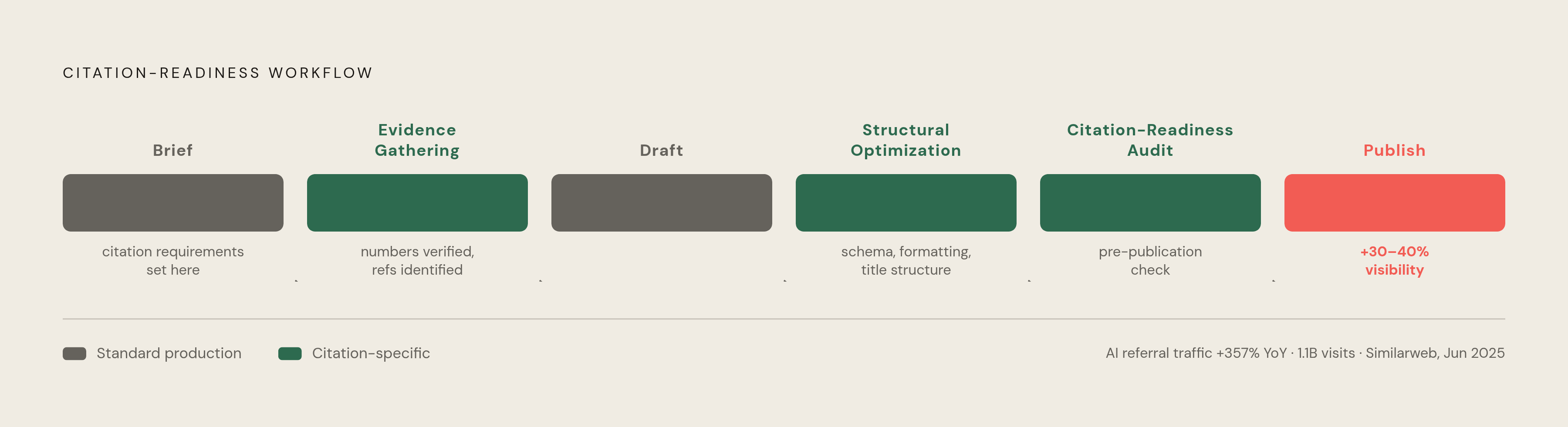
The editorial calendar now needs to factor in more, ahead of anything entering the draft stage. Princeton's work shows content holding verifiable numbers plus citations achieves 30 to 40 percent more visibility than pieces lacking them, making this an empirically validated tactic for generative optimization today, so it must begin inside your brief rather than later. A strong brief is its own citation-rate lever, not some nice-to-have layered over solid writing: when the brief is weak, the draft comes back vague, and vague material is the kind of thing an AI Overview will skip as it decides which sources it'll cite.
Citation-readiness gets its own stages inside a calendar workflow, instead of being an afterthought bolted on when publishing happens. One stage, Evidence Gathering, makes sure a draft's numbers are up to date and that each reference is identified and can be verifiable. The Structural Optimization stage checks what AI tools scan: schema, predictable formatting, and how titles are arranged. The Citation-Readiness Audit, an explicitly discrete step in NAV43/ClickUp as noted above, sits just before publication. The audit needs to cover refresh work alongside fresh content, because each recurring refresh task ought to inherit that workflow, citation review and all.
Few brands have put a visibility strategy in place yet. This gap lets agencies plus content teams fold those stages inside their calendar today: teams can build citation-readiness into their regular workflow instead of leaving it aspirational.